Get started in 5 minutes
Add your domain, audit your site, run your first AI check, and read your visibility — in a few short steps.
You can be up and running in a few minutes. Here is the whole path.
1. Add your domain
When you sign up, you enter your website. buuuzi reads it and builds a short brand profile — what you do, who you serve, your niche and markets. This profile is what we use to write relevant questions and to audit your site, so glance over it and fix anything that looks off (you will find it under Basic Info on the site page).
2. Check your AI readiness
Open the Audit tab and run it. You get an AI Readiness score out of 100 across 14 technical checks — things that decide whether AI can find, read and trust your site.
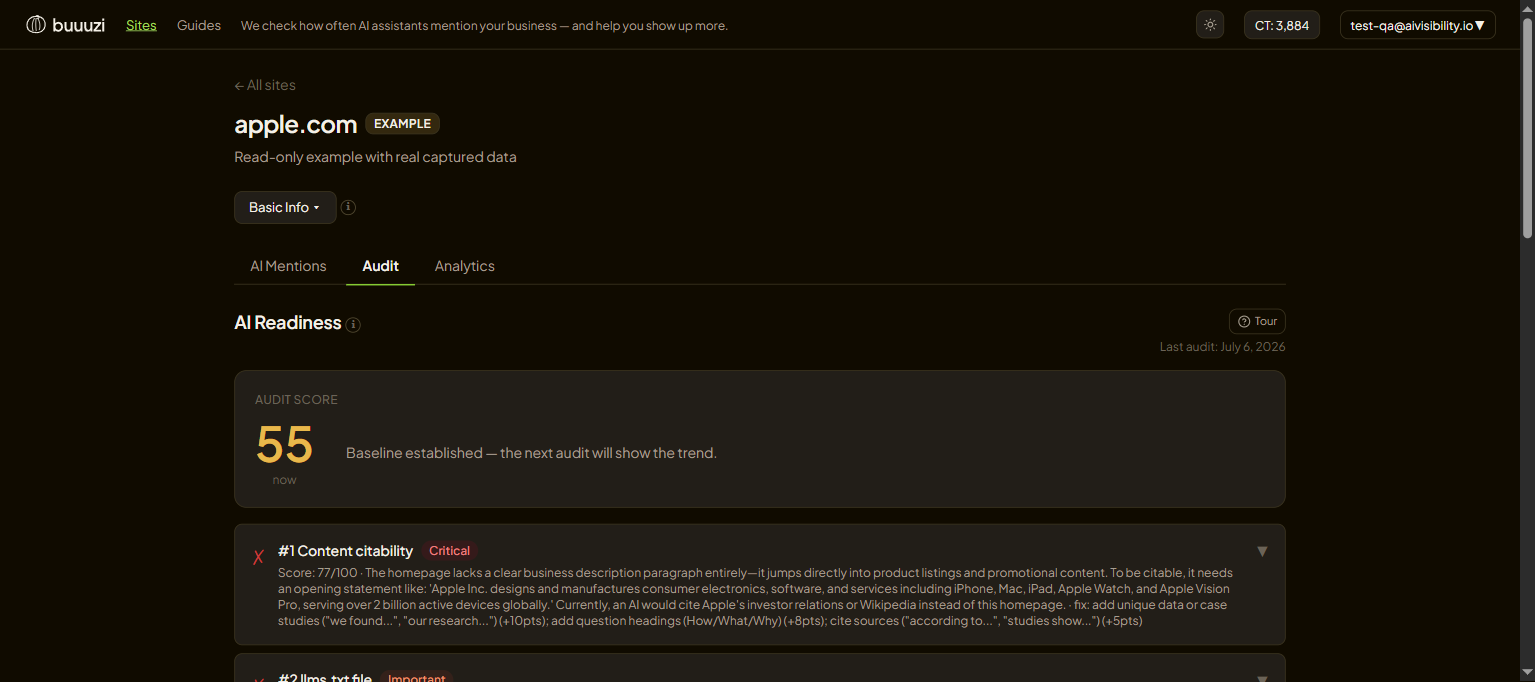
Each failed check opens up with a plain-English explanation and the exact fix. You do not have to fix everything at once — start with the high-impact ones.
3. Run your first check
Open AI Mentions → Run check, pick how deep to ask (a preset like Broad or Balanced is perfect to start), and press Run check. buuuzi asks AI assistants real questions from your niche and records every answer. It runs in the background — you can leave the page.
4. Read your visibility
When it finishes, open it from History. The headline number is Visibility Rate — the share of AI answers that mentioned you. Below it you will see who else got named (competitors), which sources the AI cited, and the exact answers.
Come back over time and watch the number move on the Analytics graph — that is how you prove your work is paying off.
Next: learn the details in Running checks and reading results.